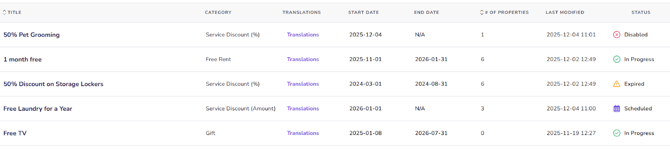
Manage Existing Promotions
- Click “Properties” from the main menu
- Choose “Promotions” from the sub menu
- Click promotion title you would like to edit from the main page
- Modify or fill in any applicable fields, including title, categories, images, status, start and end date and promotional content.
- Click on “Promotion Location” to change the property or properties that is/are impacted by this promotion
- Click on “Save Promotion” to finish
Create a Promotion
To Create a new promotion please follow the steps in the Create a Promotion article
Add a promotion category
Renters are now able to filter search results on select Rentals.ca Network listing sites based on the property offer categories.
.png?width=600&height=450&name=Promo-Categories-Email-Header%20(1).png)
✨ Currently on: Rentals.ca, Zumper, Rent Canada, Rentfaster, Rentboard, Toronto Rentals & Louer.ca ✨
You have the ability to filter by category under “All Filters”:
- Free Rent
- Rent Discount (%)
- Rent Discount (Amount)
- Free Parking
- Free Storage
- Gift
- Service Discount (%)
- Service Discount (Amount)
- Other Promotion
Under the "Promotion Category" field, select your chosen category. In the dynamic fields beneath, fill out the offer details.
Example: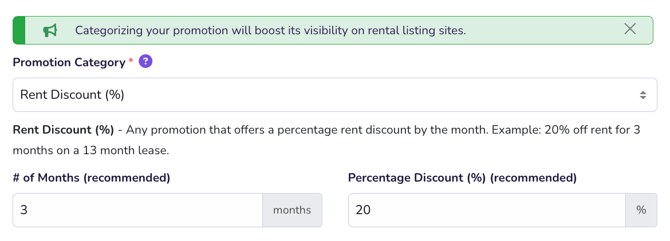 As shown above, if you select "Rent Discount (%)" as the offer category, you should fill in the number of months the discount applies to, as well as the discount percentage.
Delete an Existing Promotion
- Click promotion title you would like to delete
- Click the delete button in the bottom left corner
Promotion Statuses
- Scheduled: promotion has been set up but the start date is in the future
- In Progress: promotion is active and impacting any selected properties
- Expired: promotion was once active but it is past the end date that was selected
- Disabled: promotion status has been set to disabled